
A procurement approval workflow is a system-enforced sequence of requisition, routing, budget checks, purchase order sign-off and invoice reconciliation, built around clear spend thresholds rather than ad hoc sign-offs. The recommended pattern is straightforward: rule-based thresholds decide who approves what, the system enforces those rules automatically, and every decision leaves an audit trail. Most functioning workflows follow the same five-stage model, and teams that automate it typically cut manual procurement work by around 40%, according to Tacto Intelligence.
TL;DR:
- Automate rule-based checks like budget validation, vendor status, and invoice matching to reduce manual effort, but keep strategic decisions to humans.
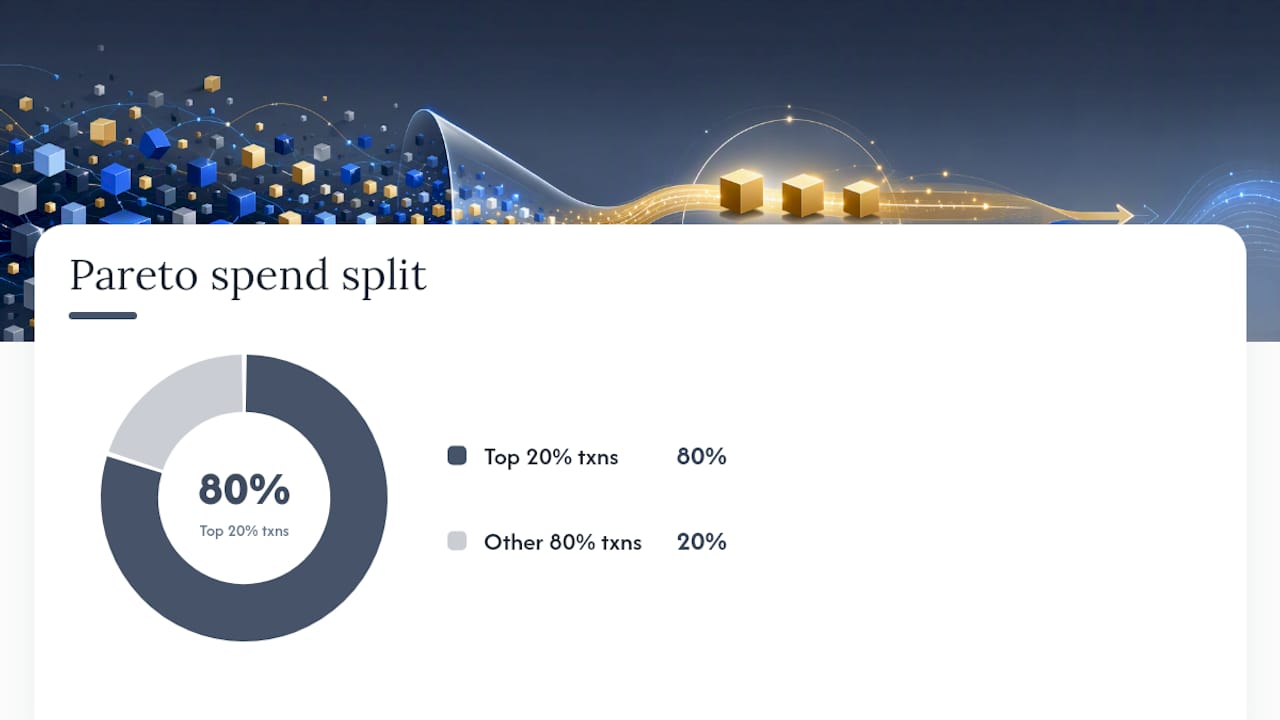
- Use spend data to set thresholds, with around 20% of transactions accounting for 80% of total spend, and revisit thresholds every two quarters.
- Choose approval routing patterns based on risk and speed needs: linear for high-value, sequential checks; parallel for routine purchases; and conditional to target risk factors.
- Address common bottlenecks by ensuring complete context at submission, enforcing substitutes, and integrating system data to prevent delays and disconnected information.
- Roll out workflow changes gradually starting with pilot departments, confirming configuration, training approvers, and establishing continuous review processes for improvement.
Table of Contents
- What are the core stages of a procurement approval workflow?
- Which routing pattern fits your purchase: linear, parallel, or conditional?
- How do you set thresholds, roles, and delegation of authority?
- What should you automate, and how do you connect the systems?
- Which KPIs tell you the workflow is actually working?
- What causes procurement approval bottlenecks, and how do you fix them?
- How do you roll out a new approval workflow without disrupting the business?
- What does this look like in practice across sectors?
- What matters most when you redesign your own workflow?
- How Keystoneconsulting supports procurement governance
- Sources
What are the core stages of a procurement approval workflow?
Every credible procurement approval process, regardless of sector, moves through the same five stages. Skip one, or blur the boundary between them, and you get exactly the kind of bottleneck this guide exists to fix.
- Requisition submission. The requester logs what they need, why, the estimated cost, the budget code and the preferred supplier. This is the single point where most delays originate, because incomplete requests bounce back and forth before anyone even reaches an approver.
- Routing. The system reads the requisition's category, amount and risk profile, then sends it to the correct approver or approver chain automatically, without a human deciding "who should sign this off."
- Policy and budget validation. The workflow checks the request against budget availability, procurement policy, and any supplier restrictions before it ever reaches a human decision maker.
- PO generation and sign-off. Once validated, the purchase order is generated and the final approver signs off, usually within a pre-agreed service level.
- Invoice reconciliation. When the invoice arrives, it goes through three-way matching against the PO and the goods receipt, closing the loop and creating the compliance record auditors will eventually ask for.
The "full context" checklist matters more than people expect. According to Legal Clarity, the highest-performing workflows give approvers everything they need at the point of submission: vendor documentation, budget code validation and a clear business case. Without that, approvers stall requests to ask questions that should have been answered upfront.
Here's what a well-logged requisition looks like in practice. A facilities manager submits a request for replacement HVAC filters at 09:14 on a Tuesday, tagging the correct cost centre and attaching a supplier quote. The system validates the budget code at 09:15 and routes it to the department manager, who approves at 11:40. Because the amount sits below the finance review threshold, it skips straight to PO generation at 11:42. The invoice arrives eleven days later, matches the PO and receipt automatically, and the audit entry records every timestamp, the approver's authority level and the rule that routed it. That last detail, capturing the rule behind the routing rather than just the decision, is what turns a workflow log into something an audit-ready trail actually looks like.
Which routing pattern fits your purchase: linear, parallel, or conditional?
Not every request should travel the same path. Choosing the wrong pattern is how low-risk purchases get stuck behind the same three signatures a capital project needs.
- Linear routing sends a request through a fixed sequence, one approver after another. It suits low-volume, high-value purchases where each reviewer genuinely adds a different check, such as a new supplier contract that needs department, finance and legal sign-off in that order.
- Parallel routing sends the same request to multiple approvers simultaneously, and it's the default choice when speed matters more than sequence. A department head and a finance reviewer can both assess a routine equipment purchase at the same time rather than waiting on each other.
- Conditional routing branches the path based on rules: amount, category, supplier risk, or business unit. A £500 stationery order might auto-approve. A £50,000 contract with a new, unvetted supplier gets diverted to a strategic sourcing review regardless of the amount, because supplier risk, not spend, is the trigger.
A hybrid pattern often works best for mid-sized organisations. Picture a construction firm approving a £40,000 equipment lease: finance and the site manager review it in parallel to keep the clock moving, while a conditional rule simultaneously checks whether the supplier has passed a compliance review in the last twelve months. If it hasn't, the request escalates to strategic sourcing regardless of what finance decides. That's conditional and parallel routing working together, not competing.
The decision criteria you use to assign a pattern should be written down, not left to instinct. Amount, supplier risk and category are the three variables that matter most, and mapping them against your existing purchase order approval process usually exposes gaps you didn't know existed, purchases that currently get the full linear treatment when a parallel review would clear them in half the time.
How do you set thresholds, roles, and delegation of authority?
Thresholds should come from your own spend data, not a template borrowed from another organisation. The most reliable method is Pareto analysis: pull twelve months of purchase order history and find the dollar value where roughly 20% of transactions by count account for around 80% of total spend, as ProcureDesk recommends to mid-market teams. Everything below that line is a candidate for auto-approval. Everything above it needs a human, and the further above it, the more humans.
A practical sequence looks like this:
- Pull historical spend by category and identify natural breakpoints, not round numbers picked for convenience.
- Set an auto-approve floor for routine, low-risk transactions that already sit within budget and policy.
- Define a review band above the floor where a single manager sign-off applies.
- Set an escalation threshold above which finance and a senior approver must both review, typically the point where 80% of your spend value concentrates.
- Revisit thresholds every two quarters as spend patterns shift.
Roles need the same rigour as thresholds. A workable role matrix has four tiers: the requestor, who submits with full context; the level one manager, who checks operational fit; the finance reviewer, who validates budget and policy; and the final approver, who signs off on anything above the escalation line. Every one of those roles needs a named substitute, because a workflow with no delegation of authority for absence grinds to a halt the moment someone goes on leave.
Pro Tip: Build your substitute rule into the system itself, not into a shared inbox someone checks manually. If the primary approver hasn't acted within your SLA window, such as within a defined business day for routine requests, the system should escalate automatically to the named substitute rather than waiting for someone to notice the backlog.
SLA and escalation rules only work if they're specific. "Approve promptly" means nothing; clear and enforceable timeframes give the system something to act on. Every escalation, override, and exception needs a recorded rationale and a second approver's sign off, because the highest-performing programmes pair thresholding with strict exception handling rather than letting overrides slide through unlogged, a point ProcureDesk's guidance makes clear. That documentation is what turns a busy quarter into an audit you can actually pass.
What should you automate, and how do you connect the systems?
Automate the checks that are rule-based and repetitive, not the ones that need judgement. Budget validation, vendor status checks, PO generation, three-way invoice matching and SLA-based escalations are all strong automation candidates because they follow the same logic every time. Strategic sourcing decisions, contract negotiation and exception handling still need a person.
- Budget and policy checks: automate the yes/no validation against available budget and procurement policy before a request ever reaches a human.
- Vendor validation: automate the check against your approved supplier list and any compliance flags.
- PO generation: once approved, the purchase order should generate itself, not wait for someone to re-key the same data into a separate system.
- Three-way matching: reconcile PO, goods receipt and invoice automatically, flagging only the mismatches for human review.
- Escalations: automate the clock that triggers reassignment when an approver misses the SLA window.
Integration is where most workflows quietly fail. If your ERP, accounts payable system and procurement platform don't share a single source of truth for budget and supplier data, you end up with three versions of "current spend" and nobody trusts any of them. Microsoft's own walkthrough for setting up approval workflows in Business Central is a useful reference here, because it shows the practical mechanics: configuring approval users, building the workflow from a template, and testing it end to end before rolling it out. Punchout catalogues that connect directly to supplier pricing reduce another common failure point, requesters guessing at costs because nobody's updated the internal price list in eight months.
Notifications matter more than most teams realise. Email alone gets buried; a workflow that also pushes to a messaging platform or mobile app sees faster response times simply because approvers see it sooner. Build in resilience too: log every manual override with a reason code, and keep a documented backup path for when the primary system goes down, because a governance process that collapses the moment the ERP has an outage isn't much of a control.
Which KPIs tell you the workflow is actually working?
Four numbers tell you almost everything: approval time per stage, end-to-end cycle time, policy compliance rate and cost per PO. Approval time per stage is simply the average hours or days a request sits with each approver, and it's the fastest way to spot exactly where a workflow stalls rather than guessing. End-to-end cycle time, requisition to PO issuance, is the number that matters to the requester and to anyone judging whether procurement is a help or a hindrance.
Compliance rate measures the percentage of purchases that went through the correct approval path rather than a workaround, and a rising number of bypasses is usually the earliest warning sign that your thresholds are miscalibrated rather than that people are being careless. Cost per PO is harder to pin down precisely because it varies heavily by industry and process maturity, but APQC's open standards benchmarking gives procurement teams a credible external reference point for what "efficient" looks like in their sector, rather than relying on a single vendor's marketing claim.
Organisations that automate procurement approvals report administrative cost reductions of roughly 20% to 40%, according to Tacto Intelligence, a range wide enough that your own baseline measurement matters more than the average.
Set targets per category rather than one blanket number across the business. A construction firm's capital equipment purchases will always carry a longer cycle time than office supplies, and holding both to the same benchmark just produces a dashboard nobody trusts. Exception reports, the list of overrides, bypasses and SLA breaches, deserve a weekly look, because that's usually where the next process fix is hiding, well before it shows up in the monthly averages.
What causes procurement approval bottlenecks, and how do you fix them?
Most bottlenecks trace back to one of four causes, and none of them need a system overhaul to fix.
- Missing approver context. Requests bounce back and forth because the approver doesn't have what they need to decide. Fix it by making vendor documentation, budget code and business justification mandatory fields at submission, not optional extras, in line with the full-context principle that consistently separates fast workflows from slow ones.
- Approver unavailability. One person on leave shouldn't stop the business buying anything. Enforce named substitutes and automatic escalation after a fixed SLA window, so absence never becomes an excuse for a stalled requisition.
- Thresholds set too low. If managers are reviewing every £200 purchase, they've stopped reading them properly, and that's worse than not reviewing at all. Rebalance using the Pareto method and auto-approve the routine, low-risk tail of your spend.
- Disconnected systems. When budget data lives in one system and supplier data in another, approvers make decisions on stale information. Integrate them, or at minimum, agree on a single source of truth that both systems reference.
Pro Tip: Before you touch a single threshold, audit your submission form first. Half of what looks like an approver problem is actually a missing-field problem, and it's the cheapest fix on this list.
How do you roll out a new approval workflow without disrupting the business?
Rolling out a redesigned workflow across the whole organisation on day one is how good governance projects fail. A staged rollout, starting with a single department or spend category, gives you room to fix mistakes before they touch every purchase in the business, a pattern Zip's implementation guide also recommends for exactly this reason.
- Choose a pilot scope. Pick one department or category, ideally one with clear volume and a manageable range of purchase types, and set explicit success metrics before you start: target cycle time, compliance rate and a maximum bypass rate.
- Build the configuration checklist. Confirm your thresholds, the full role matrix with substitutes, notification channels, escalation SLAs, and every system integration point before go-live, not after.
- Train the approvers, not just the requesters. Approvers need to understand the SLA they're bound by and what "full context" submissions look like, so they can send incomplete requests back with specific, useful feedback.
- Set go/no-go criteria. Define in advance what "the pilot succeeded" actually means, don't decide after the fact when the data is already in front of you and open to interpretation.
- Scale in phases. Add departments or categories one at a time, reviewing KPIs after each addition rather than assuming what worked in the pilot scales automatically.
Configuration details that get missed most often:
- Named substitutes for every approval role, tested during the pilot rather than assumed.
- Notification channels confirmed working across email and at least one other platform.
- Integration points between procurement, ERP and accounts payable tested end to end before go-live.
- A continuous improvement cadence, quarterly threshold review at minimum, built into the calendar from the start.
Organisational change guidance from outside procurement is worth borrowing here too; the discipline needed to get a workflow redesign adopted has more in common with broader business transformation practice than with a simple software rollout.
What does this look like in practice across sectors?
Governance failures rarely come from a lack of policy. They come from policy that isn't mapped to how the work actually happens, which is why Keystoneconsulting integrates directly with client teams rather than handing over a framework and leaving. Across healthcare, construction and facilities management, the pattern repeats: approval delays trace back to missing context and disconnected systems, not to too few sign-offs.
The Firestopping Business Dashboard illustrates the outcome mapped workflows can produce, giving teams visibility into where approvals sit and what's overdue, rather than chasing status by phone or email. Across multi-sector implementations, the recurring lesson is that audit-ready trails and shorter approval times come from the same source: rules the system enforces consistently, not more people checking each other's work.
What matters most when you redesign your own workflow?
Most procurement teams reach for more approvers when a workflow feels slow. That's usually the wrong instinct. Adding a signature adds delay without adding much genuine oversight, especially when the new approver has no more context than the last one.
Full context at submission solves more problems than another layer of review ever will. System-enforced rules also beat discretionary sign-offs almost every time, because discretion is where inconsistency and audit gaps creep in. If you're starting a redesign this quarter, don't touch your approver list first. Run the Pareto analysis on your last twelve months of spend, then rebuild your submission form around what that analysis tells you actually needs scrutiny.
— Peter
How Keystoneconsulting supports procurement governance
The client works directly alongside teams to design and implement governance that holds up under audit, not just on paper. A digital platform maps approval workflows, enforces thresholds and roles consistently, and generates AI-powered exception reports so bottlenecks surface before they become a compliance issue. For procurement teams weighing whether to build this internally or bring in delivery support, a governance-first approach integrates with existing systems and teams rather than replacing them with another disconnected tool.
If your current process relies on someone remembering to chase a stalled approval, that's a workflow gap Videra is built to close. A short diagnostic conversation typically starts by mapping existing approval paths and spend history, the same Pareto exercise this article walks through, before recommending where thresholds, roles and automation should sit. Visit Keystoneconsulting to start that conversation and scope a pilot for your own procurement function.
Sources
- Purchase approval strategies that boost visibility across teams — Amazon Business blog
- Walkthrough: Set up and use a purchase approval workflow — Microsoft Learn
- Purchase Approval Workflow: A Guide for Mid-Market Teams — ProcureDesk
- Procurement approval process: steps, roles and compliance — Legal Clarity