
Workflow automation is defined as the automatic execution of rule-based task sequences within an existing process, while process automation involves redesigning and automating entire operational processes across departments. Choosing the wrong approach is not a minor misstep. Selecting the wrong automation type leads to project failure rates of 30–40% and rework costs of £150,000 to £300,000. That figure alone should make any professional pause before reaching for a tool. Understanding the distinction between workflow automation vs process automation is the single most important decision in any automation programme.
What are the core differences between workflow automation and process automation?
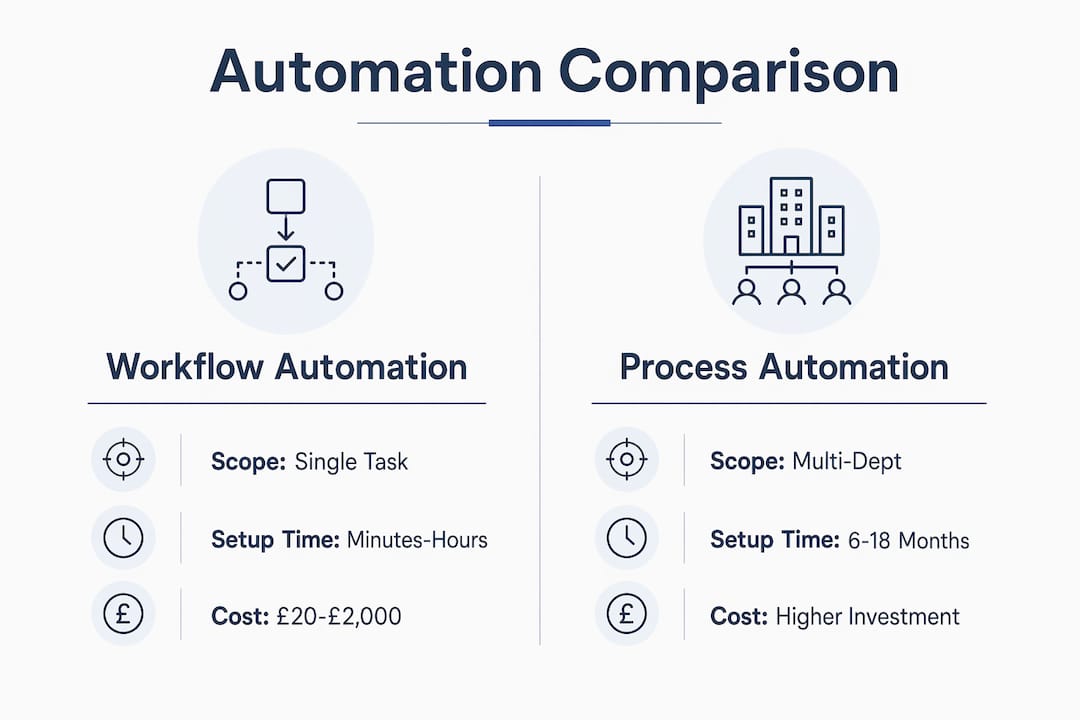
Workflow automation focuses on task-level sequences, automating individual, rule-based steps within an existing process to improve speed and consistency. Process automation, by contrast, redesigns entire cross-departmental operations before automating them. The scope difference is fundamental, not cosmetic.
Scope and complexity
Workflow automation operates within a single function. A hiring manager triggers an approval request; the system routes it, sends reminders, and logs the outcome without human intervention. Process automation spans multiple teams. An end-to-end procurement redesign, for instance, touches finance, legal, supply chain, and operations simultaneously. The coordination required is categorically different.

Cost and timeline
Workflow automation setup typically takes minutes to hours and costs £20 to £2,000 per year. Robotic Process Automation (RPA), the most common form of process-level tooling, costs £5,000 to £50,000 per bot annually and takes weeks to months to deploy. That cost gap reflects the difference in integration depth, stakeholder coordination, and change management required.
Workflow automation projects complete within 2–4 months. Process automation requires 6–18 months due to process mapping, cross-department alignment, and phased rollouts. Organisations that treat these as interchangeable routinely underestimate both budget and timeline.
Technology and integration
Workflow automation relies on API-based connectors between cloud SaaS applications. Process automation often requires deeper integration, including RPA bots that interact with legacy desktop systems lacking APIs. The technology choice follows the work environment, not the other way around.
| Characteristic | Workflow automation | Process automation |
|---|---|---|
| Scope | Single task sequences | Cross-departmental redesign |
| Typical cost | £20–£2,000 per year | £5,000–£50,000+ per year |
| Setup time | Minutes to hours | Weeks to months |
| Project duration | 2–4 months | 6–18 months |
| Technology | API connectors, SaaS tools | RPA, iPaaS, legacy integration |
| Best suited for | Stable, rule-based tasks | Complex, multi-function processes |
Pro Tip: Map your process on paper before selecting any tool. If the map shows a single team and clear rules, workflow automation is likely sufficient. If it crosses three or more departments, process automation is the right starting point.
How do workflow automation and process automation work together?
Hybrid automation strategies combining workflow automation and RPA are the prevailing model for large enterprises managing mixed IT environments. This is not a compromise. It is the most practical response to the reality that most organisations run both modern cloud applications and legacy on-premise systems simultaneously.
When a hybrid approach makes sense
Hybrid automation fits organisations where:
- The technology environment spans modern SaaS platforms and legacy desktop applications.
- Different teams have different technical capabilities, with some ready for API-based workflow tools and others dependent on screen-based RPA.
- Governance requirements demand audit trails across both automated and manually handled steps.
- The organisation is scaling automation incrementally rather than replacing all systems at once.
A facilities management firm, for example, might use workflow automation to route maintenance requests through a cloud-based ticketing system, while an RPA bot extracts data from a legacy asset register that has no API. Neither tool alone solves the problem. Together, they cover the full operational chain.
Orchestrating the two approaches
Mature organisations deploy layered automation that matches tool type to work classification: workflow automation for stable, predictable tasks; RPA for legacy system interactions; and AI-assisted tools only where genuine human judgement is required. This layered model prevents the common mistake of applying one tool type to every problem. Integration platforms such as iPaaS solutions sit between these layers, passing data between systems and maintaining a single source of truth.
Pro Tip: Before building a hybrid model, audit your IT estate. List every system your process touches and note which ones have APIs. That list determines your tool mix far more reliably than any vendor's sales pitch.
What are the common pitfalls when choosing between the two?
The most expensive mistake in automation is applying workflow automation to a broken process. Workflow automation assumes sound upstream process design. If the underlying process is flawed, the automation simply executes the flaw faster and at greater scale.
Automating the wrong level
- Automating a broken process. Workflow tools accelerate whatever they touch. A flawed approval chain becomes a faster flawed approval chain. Process redesign must come first.
- Mis-scoping the initiative. Treating a cross-departmental problem as a single-team workflow issue leads to partial solutions and expensive rework.
- Overusing RPA. RPA is powerful for legacy system interaction, but deploying it where API-based workflow tools would suffice inflates cost and maintenance burden without adding value.
- Ignoring exception handling. Applying workflow automation to tasks requiring genuine human judgement creates hidden manual work. Staff quietly handle exceptions the tool cannot process, which distorts ROI calculations and masks real automation performance.
- Skipping process mapping. Selecting a tool before mapping the process is the single most reliable way to waste budget. Good process mapping software makes this step faster and more accurate.
The diagnostic question is simple: is a single step within your process failing, or is the entire operational function not meeting its goals? Fix workflows when one step is broken. Redesign the process when the collection of steps no longer fits together properly.
Recognising which problem you are solving before selecting a tool is the difference between a successful automation programme and an expensive lesson.
When should you implement workflow vs process automation?
The decision framework starts with three criteria: process stability, decision complexity, and system API availability. Each criterion points toward a different tool category.
Key decision criteria
- Process stability. Stable, well-defined processes with clear rules suit workflow automation. Processes that change frequently or involve significant human judgement require process redesign before any automation layer is added.
- Decision complexity. Low-complexity, binary decisions (approve or reject, pass or fail) are ideal for workflow automation. High-complexity decisions involving multiple variables and stakeholder input signal the need for process automation with human oversight built in.
- API availability. Cloud SaaS environments with open APIs support workflow automation directly. Legacy desktop applications without APIs require RPA. Mixed environments require a hybrid approach.
Organisational readiness factors
| Readiness factor | Workflow automation | Process automation |
|---|---|---|
| Stakeholder alignment needed | Low to moderate | High |
| Technical skills required | Low (no-code/low-code tools) | Moderate to high |
| Governance framework needed | Basic audit trail | Full compliance framework |
| Change management effort | Low | High |
| Recommended first step | Deploy and iterate | Map and redesign first |
Automation selection works best when treated as matching tools to work classification rather than following a technical hierarchy. Start with a work classification audit: list every task in the process, note its frequency, rule-based nature, and system dependency. That audit determines the right tool mix. Organisations using AI-assisted project management tools can accelerate this classification step considerably.
The recommended sequence for most organisations is: map the process first, redesign if necessary, apply workflow automation to stable task sequences, and layer RPA or AI only where the work genuinely requires it.
Key takeaways
Workflow automation and process automation are not interchangeable: choosing the right approach based on scope, process stability, and system environment is the single most important factor in automation success.
| Point | Details |
|---|---|
| Define scope first | Workflow automation targets task sequences; process automation redesigns entire cross-departmental operations. |
| Cost and time differ significantly | Workflow automation costs £20–£2,000 per year; process automation can reach £50,000+ and take 6–18 months. |
| Hybrid models are common | Most large organisations combine workflow automation and RPA to cover both cloud and legacy environments. |
| Map before you automate | Automating a broken process accelerates the flaw; process redesign must precede any automation layer. |
| Match tools to work type | Stable tasks suit workflow automation; legacy systems need RPA; judgement-heavy tasks need human oversight built in. |
The automation question most organisations are asking too late
The conversation I have most often with organisations goes like this: they have already purchased a tool, deployed it across a process, and are now wondering why the results are disappointing. The tool is rarely the problem. The sequencing is.
Automation is not a hierarchy where you graduate from workflow tools to RPA to AI as you become more sophisticated. Each tool type fits a specific category of work. Treating them as a progression leads organisations to deploy RPA where a simple API connector would have done the job in a fraction of the time and cost.
The work classification audit is the step most teams skip because it feels slow. It is not slow. It is the fastest way to avoid six months of rework. Spend two weeks mapping your processes properly, and you will know exactly which tool belongs where before you spend a pound on licences.
The other pattern I see repeatedly is the invisible workforce problem. A workflow tool is deployed, the dashboard shows high automation rates, and everyone is satisfied. Meanwhile, a small group of staff are quietly handling every exception the tool cannot process. The real automation rate is a fraction of what the dashboard reports. This is not a technology failure. It is a scoping failure that process mapping would have caught.
Vendor capabilities are blurring the lines between workflow automation, RPA, and AI. That makes the classification question more important, not less. When every platform claims to do everything, the only reliable guide is a clear understanding of your own work types.
— Peter
How Keystoneconsulting supports automation delivery
Keystoneconsulting works directly with teams in healthcare, construction, and facilities management to get automation sequencing right from the start. With 20 years of experience addressing governance failures and reporting bottlenecks, the approach is grounded in process mapping before tool selection, not the other way around. The Videra platform combines mapped workflows with AI-powered reporting to give organisations audit-ready compliance and clear operational visibility. Whether your challenge is a single broken workflow or a cross-departmental process that needs redesigning, Keystoneconsulting integrates directly with your team to build capability that lasts.
FAQ
What is the main difference between workflow and process automation?
Workflow automation targets individual, rule-based task sequences within an existing process. Process automation redesigns entire cross-departmental operations before automating them, making it broader in scope and longer in implementation.
What is the difference between RPA and workflow automation?
RPA (Robotic Process Automation) interacts with legacy desktop applications that lack APIs, typically costing £5,000 to £50,000 per bot annually. Workflow automation uses API connectors between cloud SaaS systems and costs as little as £20 per year.
When should I use process automation instead of workflow automation?
Use process automation when the problem spans multiple departments, involves complex decision-making, or when the underlying process is broken and needs redesigning before any automation is applied.
Can workflow automation and process automation be used together?
Yes. Hybrid automation combining workflow automation and RPA is the standard model for large enterprises running both modern cloud applications and legacy on-premise systems.
What is the biggest risk when choosing an automation approach?
The biggest risk is applying workflow automation to a flawed process. Automating a broken process executes the flaw faster and at scale, leading to project failure rates of 30–40% and significant rework costs.